Basin Climbing — Member App
A cross-platform mobile app I designed, built, and shipped end-to-end for Basin Climbing & Fitness, a climbing gym in Waco, TX. From zero to live on the App Store in about five weeks, including the backend, AI chatbot integration, and rewards/redemption system used by real customers and staff.

The problem
Basin has ~14,000 customers, ~500 active members, and a small crew that wears every hat. The existing member experience lived across three places: a check-in barcode locked behind the gym-management system, a Shopify storefront for memberships, and email/SMS marketing. There was no single surface that a member could open on their phone to:
- check in fast at the front desk
- see their rewards and earn progress
- view their whole family’s barcodes and rewards together
- get a quick answer to a question without calling
- give feedback that actually reaches the team
I built that surface.
What it does
Sign in without a password
A one-time code goes to phone (SMS via Twilio) or email (via SendGrid). The system looks the customer up in the gym’s data and signs them in. No passwords, no second factor, no friction at the front desk.
Multi-member households
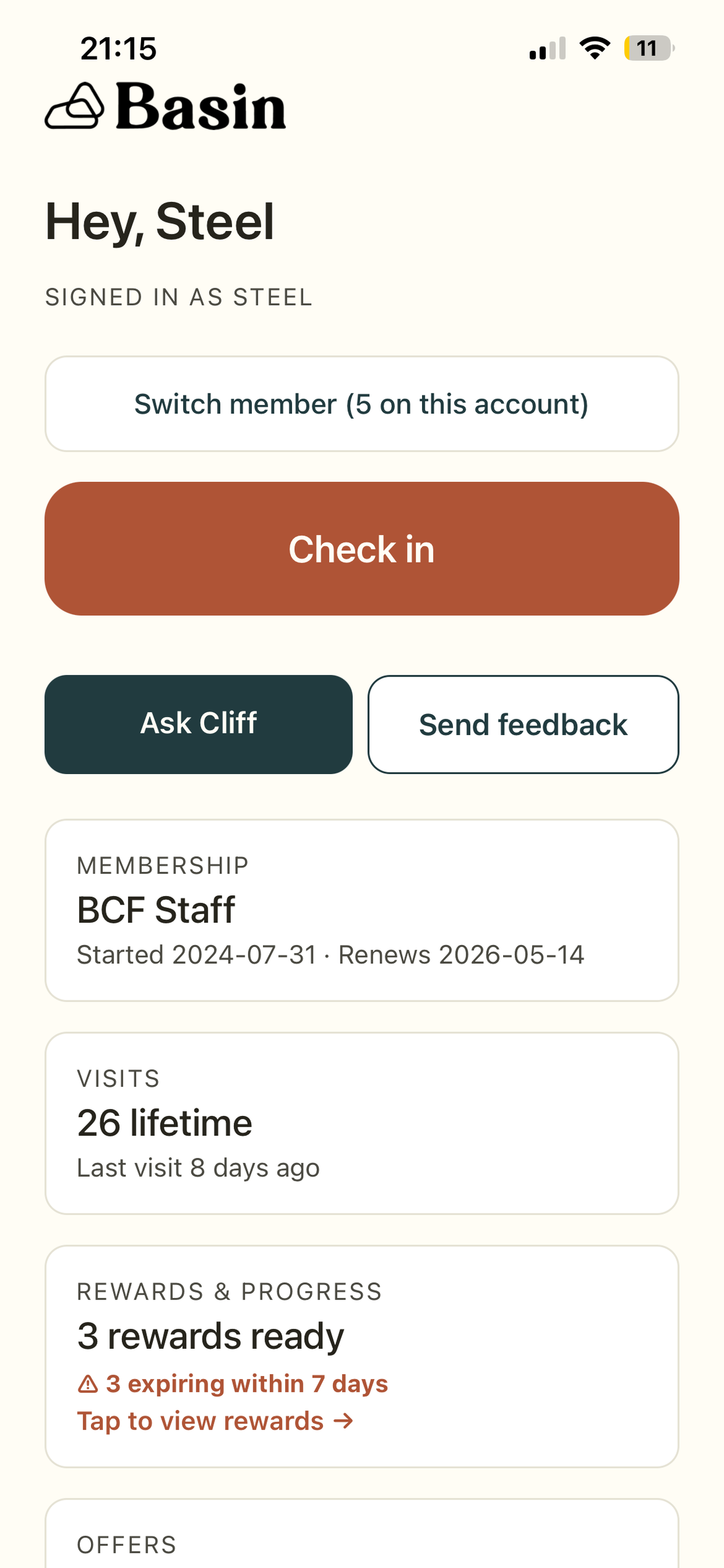
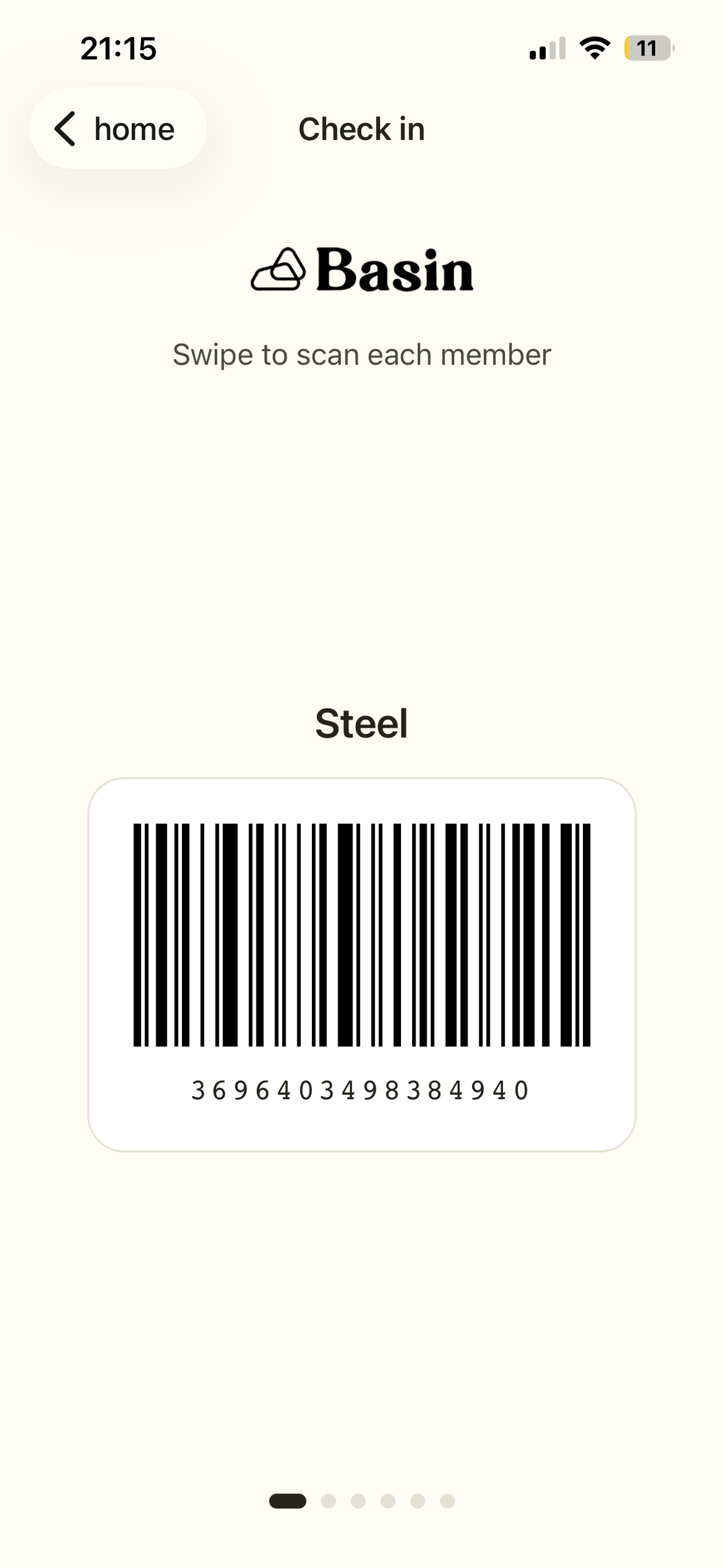
A single sign-in surfaces every person in the family. A parent can swipe through their kids’ and partner’s check-in barcodes and rewards as easily as their own. Family links come from the gym’s relationship data, scoped to high-confidence parent-child records — false positives (a friend who once booked a class for someone else’s kid) were a real bug I had to design around.
Rewards system with QR redemption
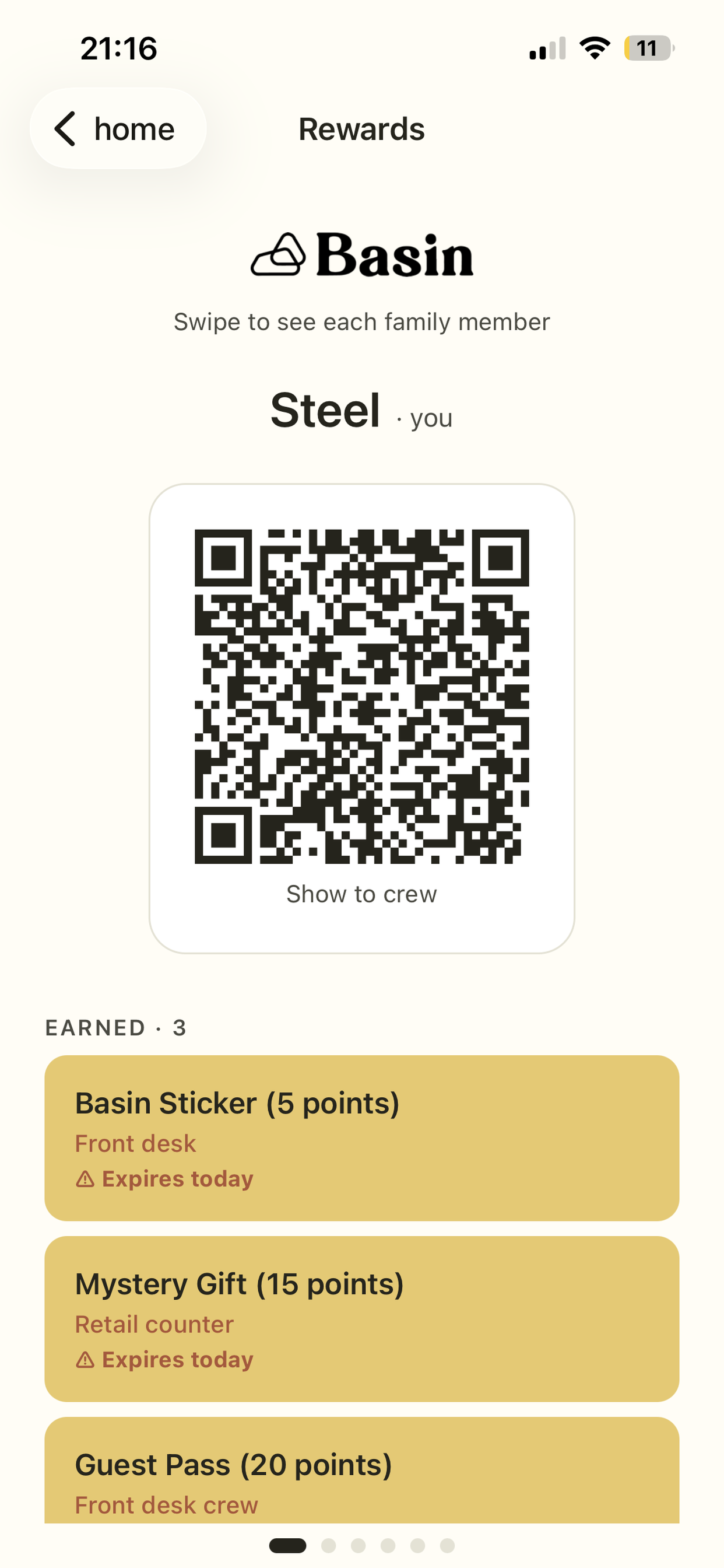
Each family member’s earned rewards and in-progress milestones appear in a swipeable per-member carousel. Each card has its own QR code that opens the staff CRM filtered to that customer. Confetti fires the first time a new reward appears on the screen. Expiring-soon warnings light up in red 7 days before a reward expires.
AI assistant (“Cliff”) for member questions
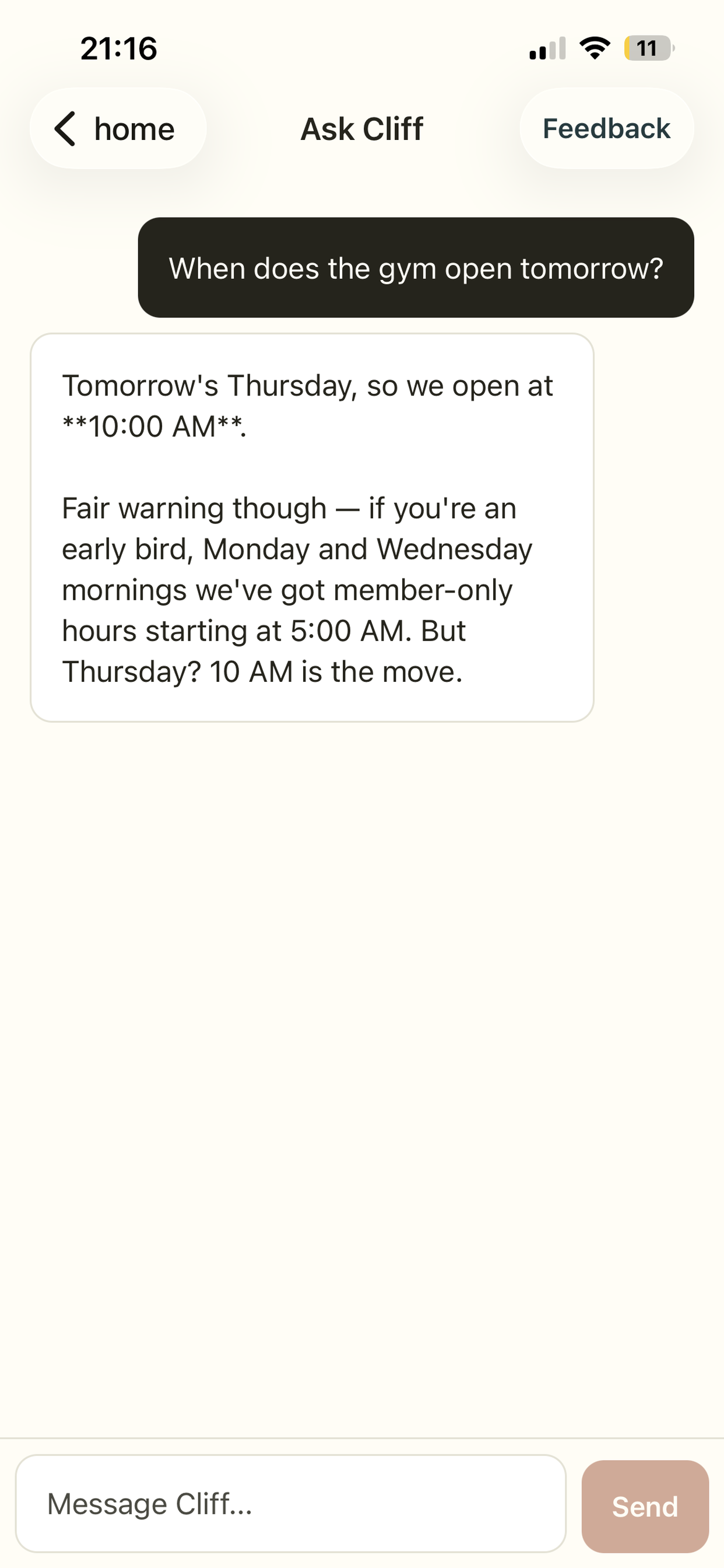
The app embeds a chat surface that talks to a separate AI agent service over an authenticated proxy. The agent knows who the member is (member ID passed via shared-key headers) so it can answer “how many times have I been here?” or “when does my membership renew?” without the member ever having to repeat themselves. Auth flows through once — they never sign in twice.
Account deletion built into the app
Per Apple’s App Store Guideline 5.1.1(v), every app with account creation must also offer in-app account deletion. The flow walks the user through what gets removed (sessions, push token, feedback contact info) and what is preserved (their gym membership, which lives separately).
Feedback channel directly from the app
Users can send feedback about either the app itself or the chatbot from a single screen. The form pre-tags the category based on where they opened it from (Home button → “app”; chat header → “Cliff”). Each Cliff-feedback message is automatically tagged with the chat session ID so we can correlate it back to the conversation.
Brand polish
Logo and screen flow follow the brand: Libre Franklin–adjacent typography, off-white background (#FFFDF5), dark text (#26241C), warm orange (#AF5436) for the check-in action. The welcome modal — pops up on first launch, accessible later via “About this app” — closes with: “We hope you enjoy our app. We made this for you with love. — Your local Basin team.”
Tech stack
Mobile (basin-app)
- React Native via Expo (SDK 54), TypeScript
- File-based routing via
expo-router expo-secure-storefor JWT + refresh token storage (iOS Keychain / Android Keystore)react-native-qrcode-svgandreact-native-barcode-svgfor in-app barcode + QR renderingexpo-notificationsfor push registration and deep-link handlingexpo-brightness+expo-keep-awakeso the barcode is always scannable- EAS Build for native binaries, EAS Update for over-the-air JS releases
Backend (basin-app-api)
- FastAPI on Python 3.11, deployed to Heroku
- Neon Postgres for app-side state (sessions, OTPs, push tokens, feedback, account-deletion-safe records)
- Supabase for read access to the gym’s rewards data (
offers+offer_awardstables maintained by a separate data pipeline) - AWS S3 for read access to ~14k customer records, family graph, check-ins, and barcodes
- Twilio (SMS), SendGrid (email), PyJWT, requests, psycopg
Distribution
- iOS: TestFlight internal + external testing → App Store Connect, submitted as Unlisted App
- Android: Play Store Internal Testing track via Google Play Console
- EAS Update with separate channels (
production,preview) so staging features ship to a smaller cohort before everyone else
Notable engineering decisions
Read-only against the gym’s data
The gym’s source of truth is a third-party gym management system (Capitan). I never write back to it. The app’s backend reads pre-computed customer/family/checkin data from S3 (refreshed 3x daily by a pipeline) and rewards data from Supabase (refreshed by the same pipeline). This made the app safe to ship fast and easy to roll back.
Family graph filtering
The first version of the household view surfaced anyone the data pipeline had ever inferred as a “family member” — which included anyone who’d once booked a class for someone else’s kid. Real user complaint: “why is Stephanie showing up under my account?” Fixed by trusting only high-confidence (explicit Capitan-API-declared) parent-child links and ignoring inferred ones (reservation bookings, last-name matches).
One QR for all rewards
First design had one QR per reward, encoding a custom URL scheme the staff would scan. Second design (after user feedback): a single QR per customer that opens the staff CRM page filtered to that customer. Staff sees everything at once, can mark redeemed in the existing dashboard, no new tooling needed.
Staging via EAS Update channels
Production builds and preview builds in TestFlight are subscribed to different EAS Update channels. A code change ships to preview first (a small group), gets tested on real phones in a day, then promotes to production. The preview build shows a yellow “PREVIEW BUILD” badge under the logo so testers always know which environment they’re on.
No analytics SDKs, no tracking
Deliberate: the app collects only what it needs to function (auth identifiers, feedback content, push tokens). No Mixpanel, no Amplitude, no Sentry yet. The App Store privacy questionnaire is short and honest as a result.
Demo account for Apple reviewers
Apple’s reviewer can’t read a real OTP email. I added a backend bypass where the email testing@basinclimbing.com plus the code 635251 always succeeds, mapped to a real demo customer with the richest possible account state (5 family members, 5 earned rewards, in-progress milestones). Apple approved the app on first technical review after this was in place.
Distribution status
- iOS App Store — submitted, approved, listed as Unlisted App (installable via direct link)
- iOS TestFlight — production build live; preview build with PREVIEW badge for staging
- Google Play Store — production AAB built and ready; awaiting Play Console enrollment approval, will launch to Internal Testing track first
- Backend — production on Heroku with health check, real-time logs, and zero downtime over four weeks of deploys
Repos
Both private GitHub repos:
steelferguson/basin-app— mobile (React Native / Expo)steelferguson/basin-app-api— backend (FastAPI / Heroku)
What I’d do next
- Push notifications go-live — backend and mobile registration code are built; the final piece is a small cron job on Heroku Scheduler that reads the rewards table for expiring-soon rows and triggers the existing send endpoint
- Real Android iPad/tablet layouts if member feedback supports it
- Per-user notification preferences (timezone, quiet hours, opt-in/out per category)
- EAS Update analytics dashboard so we can see staging adoption before promoting
Asset checklist for your site
Copy these into your images/ folder (or wherever your site expects them):
| Source | Suggested name |
|---|---|
/Users/steelferguson/daily_sessions/projects/basin-app/assets/basin_logo_dark.png | basin_logo_dark.png |
/Users/steelferguson/daily_sessions/screenshots-resized/IMG_9453.PNG | signin.png |
/Users/steelferguson/daily_sessions/screenshots-resized/IMG_9454.PNG | home.png |
/Users/steelferguson/daily_sessions/screenshots-resized/IMG_9455.PNG | rewards.png |
/Users/steelferguson/daily_sessions/screenshots-resized/IMG_9456.PNG | chat.png |
/Users/steelferguson/daily_sessions/play-store-feature-graphic.png | feature_graphic.png (good for a wider hero) |
If your screenshots-resized order doesn’t match the captions (sign-in → home → rewards → chat), swap the filenames in this checklist before copying.